
Quick Tips for Mouse Users
1- Keep the mouse and keyboard close to you but leave room in front for
your hand to rest supported.
2- Rest your fingers on the mouse when using it. Only have your hands
on it when using it.
3- Hold the mouse comfortably without gripping too tightly.
4- Use a mouse pad for better contact.
5- Learn and use keyboard shortcuts to reduce mouse use.
6- The mouse can be placed on the left side (or non-dominant handed side)
of the keyboard.
Computer Mouse
Can using a mouse cause injuries?
Users of the computer mouse often experience sore fingers, wrists, arms
and shoulders. Although there are not many studies on mouse use, ergonomists
indicate that the design of the mouse, where you place it on your desk,
and how you use it can prevent discomfort and fatigue.
Where should you place the mouse?
The computer mouse is most commonly used in combination with a keyboard.
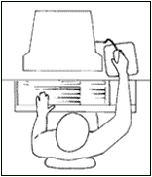
Computer users usually place the mouse to the side of and ahead of the
keyboard. This causes users to stretch their arms and shoulders creating
discomfort and fatigue.
 Wrong Positioning
 Correct Positioning
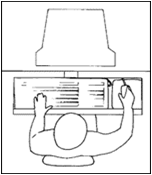
One way to reduce discomfort and potential injury is to place the mouse
at the same level and as close to the side of the keyboard as feasible.
The mouse and keyboard should be on the same work surface. There should
be enough room to work the mouse so that variation in arm position is
possible.
Make sure that the mouse cord does not hinder any movements. Always use
a pad designed for the computer mouse and make sure it stays clean. The
work surface should be set up in a way that also accommodates left-handed
people.
Here are suggestions about the proper way to use a mouse and to avoid
discomfort and fatigue:
• Don't squeeze the mouse. Hold it loosely in your hand and relax
your grip. A tight grip will not help to position the pointer any more
accurately or quickly.
• Keep your wrist straight. Your forearm, wrist and fingers should
all be in a straight line.
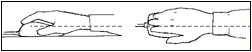
• Adjust the mouse speed setting. The mouse is harder to control
if you use a fast setting. Some computer users also get relief from using
the mouse by using keystroke combinations as short-cuts for various computer
program functions.